


Those tiny black and white squares can hold links, contact details, payment information and much more. But how can something that looks so simple store all that data?
You have probably scanned a QR code to open a website, make a payment, join a Wi-Fi network or access a digital menu.
At first glance, a QR code looks like nothing more than a collection of random black-and-white squares. In reality, those squares form a carefully organised pattern designed to represent and store digital information.
So, how does it work?
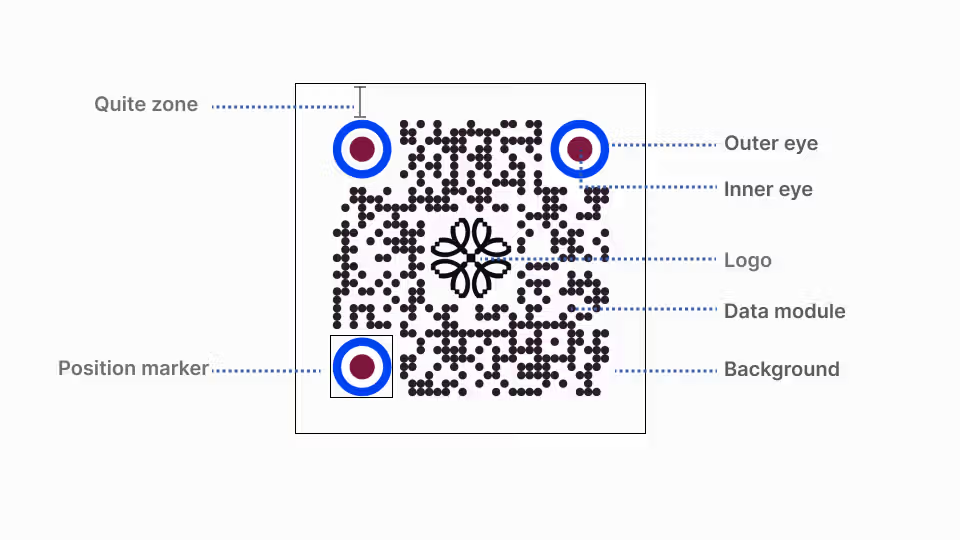
A QR Code Is Made of Tiny Squares
The black and white squares inside a QR code are called modules.
Each module represents part of the information encoded in the QR code. Together, these modules form a structured pattern that a camera or scanner can recognise and translate back into digital data.
QR codes come in different sizes. The standard QR Code has 40 versions, ranging from Version 1 with 21 × 21 modules to Version 40 with 177 × 177 modules. As more information needs to be stored, more modules are required.
This is one reason a QR code containing a long piece of information can look much more complicated than one containing a simple website address.
It Does Not Store Everything in Plain Text
A QR code does not simply write a website address across the squares like text on a page.
The information is converted into a digital format and organised into patterns that the QR code reader can understand. QR Code supports different types of data, including numbers, letters, binary data and Japanese characters.
This makes QR codes much more flexible than traditional one dimensional barcodes.
For example, a QR code can contain a web address. When your phone scans it, the phone reads the encoded information and recognises that it represents a URL.
Why Are There Three Big Squares?
Look at almost any standard QR code and you will notice large square patterns in three corners.
These are position detection patterns.
They help the scanner quickly determine where the QR code is and its orientation. This allows a QR code to be scanned from different directions rather than requiring you to hold your phone at one exact angle.
That is why you can often scan a QR code even when it is rotated or viewed from an unusual angle.
What Happens If Part of the QR Code Is Damaged?
This is one of the cleverest parts of QR technology.
QR codes include error correction. Extra information is added to the code so that some missing or damaged data can be recovered during scanning.
The standard QR Code has four error correction levels: L, M, Q and H. Depending on the selected level, approximately 7%, 15%, 25% or 30% of codewords can be restored.
This is why a QR code can sometimes still work even when part of it is scratched, dirty or covered.
However, error correction does not mean a QR code can be damaged without limits. Enough damage or poor printing can still make it impossible to scan.
So How Much Can a QR Code Actually Store?
More than you might expect, but not an unlimited amount.
A maximum Version 40 QR Code can encode up to 7,089 numeric characters, 4,296 alphanumeric characters, or 2,953 bytes of binary data, depending on the encoding and error correction level.
That is enough for many practical uses, such as website addresses, text, contact information and other small amounts of digital data.
It is not designed to store an entire movie or a large photograph. DENSO WAVE notes that even the largest standard QR Code stores only around 3 KB or less of practical data under certain conditions.
Your Phone Turns the Pattern Back Into Information
When you point your camera at a QR code, your phone identifies the position patterns, reads the modules and processes the encoded data.
The result could be a website address, text, contact information or another type of supported data.
The process happens so quickly that it feels almost instant.
The Simple Answer
A QR code does not store a huge amount of information in a mysterious way.
It stores digital information as a carefully organised pattern of tiny squares. Different QR Code sizes provide different amounts of space, while position detection patterns help scanners recognise the code and error correction helps recover information when part of the code is damaged.
What looks like a random collection of black and white squares is actually a compact data structure designed to be read quickly by machines.
The next time you scan one, you are essentially using your phone to turn a visual pattern back into digital information.


