WhatsApp is introducing one of its most requested features, allowing users to write messages now and choose exactly when they should be delivered.
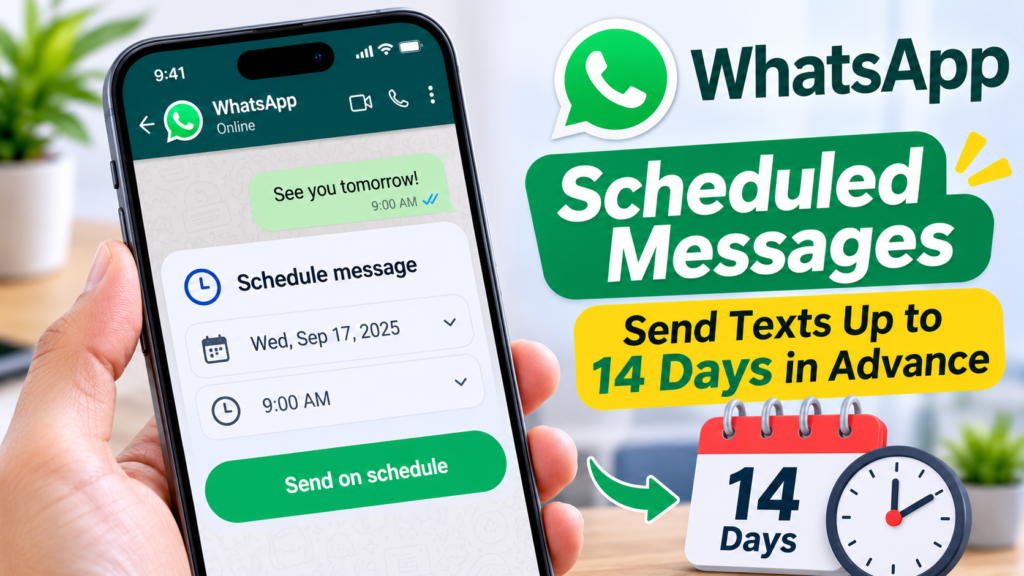
WhatsApp has officially introduced scheduled messages, giving users the ability to send texts, photos and videos at a selected future date and time. Announced on November 25, 2026, the feature works in both individual and group conversations and allows messages to be scheduled between 10 minutes and 14 days in advance.
For years, WhatsApp users have relied on reminders, third-party applications and manual methods to remember important messages. The new feature removes much of that inconvenience by allowing users to prepare messages directly inside WhatsApp.
The update is particularly useful for birthday wishes, work reminders, important announcements and conversations with people living in different time zones. WhatsApp says scheduled messages will remain end-to-end encrypted and will be delivered even if the sender’s phone is switched off.

How Does WhatsApp Scheduled Messaging Work?
The new feature allows users to prepare a message without sending it immediately. Instead, they select a future delivery time, and WhatsApp handles the delivery automatically.
For example, imagine remembering someone’s birthday late at night. Instead of staying awake until midnight, you can write the message earlier and schedule it to arrive at the right moment.
The same functionality works for group conversations. Someone organising a meeting can prepare an announcement in advance and schedule it for the morning without needing to remember to send it manually.
WhatsApp supports the following content:
- Text messages: Write a message and select its delivery time.
- Photos: Schedule images to arrive later.
- Videos: Prepare video messages for future delivery.
- Individual chats: Send scheduled messages to one person.
- Group chats: Schedule announcements and updates for group members.
The scheduling window starts at 10 minutes and extends up to 14 days. Messages appear like ordinary WhatsApp messages when they reach the recipient.
How to Schedule a Message on WhatsApp
Scheduling a message does not require a separate application or complicated settings. Once the feature becomes available on your account, you can use it directly from a conversation.
Follow these steps:
Step 1: Open WhatsApp
Launch WhatsApp on your Android smartphone or iPhone.
Step 2: Select a conversation
Open the individual or group chat where you want to send the scheduled message.
Step 3: Write your message
Type the message you want to deliver later. You can also attach a supported photo or video.
Step 4: Press and hold the send button
Instead of tapping the send button normally, press and hold it to open the scheduling option.
Step 5: Select the date and time
Choose when you want WhatsApp to deliver the message. You can select a time between 10 minutes and 14 days ahead.
Step 6: Confirm your schedule
Review the selected date and time, then confirm. WhatsApp will keep the message scheduled until the selected delivery time.
Once scheduled, you can review upcoming messages and delete them if your plans change.
Will WhatsApp Send Messages If Your Phone Is Switched Off?
Yes. One of the most useful aspects of the new feature is that scheduled messages do not depend on your phone remaining switched on.
According to WhatsApp, a scheduled message will still be delivered at the selected time even if your phone is switched off or its battery runs out.
This makes the feature more practical than methods that depend on keeping a device active or running an external scheduling application.
Users do not need to open WhatsApp again at the scheduled time. The message is prepared in advance and delivered automatically.
Are Scheduled WhatsApp Messages Private?
Privacy is another important part of the announcement.
WhatsApp says scheduled messages retain the same end-to-end encryption used for regular personal conversations. This means the content remains protected so that only the participants in the conversation can read it.
WhatsApp also says recipients will see scheduled messages like normal messages. They will not receive a special label indicating that the message was prepared earlier.
This is useful for people who want to send birthday wishes, personal greetings or important updates at a particular time without making the scheduling process visible to the recipient.
Can You Cancel a Scheduled Message?
Yes. WhatsApp allows users to review their upcoming scheduled messages and delete them before delivery.
This is helpful when plans change or a message is no longer relevant.
For example, if you schedule a meeting reminder but the meeting is cancelled, you can remove the pending message before it reaches the group.
However, users should not assume that an already scheduled message can be edited or have its delivery time changed. WhatsApp’s announcement confirms that pending messages can be deleted, but does not clearly promise a full editing or rescheduling option.
How Is WhatsApp Different From Telegram and Signal?
WhatsApp is not the first messaging platform to introduce scheduled messages. Other popular communication services have already offered similar functionality.
| Feature | Telegram | Signal | |
| Scheduled messages | Yes | Yes | Yes |
| Individual chats | Yes | Yes | Yes |
| Group conversations | Yes | Yes | Yes |
| Scheduling limit | Up to 14 days | No equivalent 14-day limit | Available |
| End-to-end encryption | Yes, for personal chats | Depends on chat type | Yes |
| Delete before delivery | Yes | Yes | Yes |
The main advantage of WhatsApp’s announcement is that users can now schedule messages without relying on another application.
WhatsApp’s two-week scheduling window is sufficient for many everyday situations, although people who need to plan messages further in advance may prefer services with longer scheduling options.
What Does This Mean for Businesses and Group Administrators?
Scheduled messages could also make everyday communication easier for people who use WhatsApp to coordinate work and community activities.
For example, a group administrator can prepare an event announcement in advance. A project team member can schedule an update for the beginning of the working day. Someone managing a community group can prepare a reminder without having to return to the conversation later.
Small businesses may also find the feature useful when communicating with customers through regular WhatsApp accounts.
However, users should understand that the announcement does not confirm availability for every WhatsApp product. In particular, businesses using the separate WhatsApp Business application should check its supported features rather than assume that the same scheduling option is already available there.
When Will Scheduled Messages Be Available to Everyone?
WhatsApp announced that scheduled messages are rolling out globally over the coming weeks on Android and iOS.
This means the feature may not appear immediately for every user. Availability can vary while the rollout progresses.
Users should keep their WhatsApp applications updated through the official Google Play Store or Apple App Store and check their chats for the scheduling option.
There is no need to download an unofficial application or provide account access to a third-party scheduling service to use the official feature.
A Small Update That Could Change Everyday Messaging
Scheduled messages may not completely transform how people communicate, but they solve a problem that WhatsApp users have experienced for years.
The ability to prepare a message now and send it at exactly the right time makes everyday communication more convenient. It is particularly useful for birthdays, reminders, work updates and conversations across different time zones.
With its global rollout beginning, WhatsApp is finally bringing a familiar feature from competing messaging platforms into one of the world’s most widely used messaging applications.
For users who regularly forget important messages or need to communicate at specific times, this could become one of WhatsApp’s most practical updates.